Monochrome coloring books, from idea to print-ready file
Plan, generate, check and export black-and-white coloring pages in one workspace. Use your own AI key, keep full control of every page, and export PDFs with a preflight report.
Purchasing is not available yet.
See how it worksRequires your own OpenRouter API key. AI usage is billed by your provider.


No color contamination
Content close to edge
300 DPI at 8.5×11 in
How it works
One workspace from idea to export. You review and approve every page.
Plan the book
Pick a theme, audience, page size and one of four monochrome style presets.
Generate pages
Use an administrator-approved image model with your own OpenRouter key. Jobs run in a queue with retries.
Check and fix
Automated checks flag gray pixels, heavy black areas, low contrast and cut-off art. Crop, threshold and fit to page.
Assemble and export
Add title and copyright pages, reorder, preview, and export PDF/PNG/ZIP with a preflight report.
Four monochrome styles, each with its own rules
A solid silhouette with white details is not the same as an outline page. Each preset has its own prompt template and quality criteria. The images below are hand-made vector illustrations of each style, not AI output.
Solid black silhouette shapes containing white fillable detail areas. Different from outline pages: large areas are filled black.
Uniform black outlines on a white background. Classic coloring-page style with open white regions to color.

Detailed black-and-white ornamental artwork with fine decorative linework for experienced colorists.
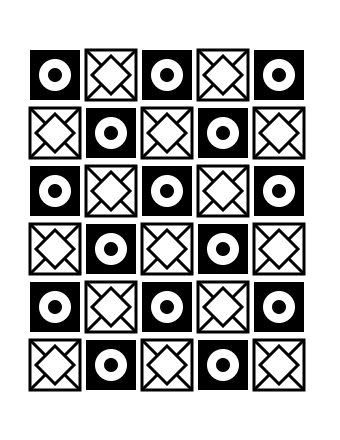
Bold geometric or repeating decorative patterns with strong black/white contrast.
Built for monochrome, not adapted to it
General image tools drift toward gray shading, color tints and cropped subjects. Monochrome Studio AI uses style-specific prompts and checks so your pages stay black and white, centered and printable.
Use cases
- Printable coloring books for Etsy and your own store
- Print-on-demand interiors prepared for KDP-style workflows
- Classroom and educational coloring sheets
- Themed collections for seasonal and wedding events
- Personal projects and gifts
Core features
Monochrome Studio AI keeps the whole workflow in one place: style presets built for monochrome output, project-based page management, automated quality checks, basic image editing, and PDF/PNG/ZIP exports with a preflight report.
Four monochrome style presets with their own prompt templates and quality criteria
Projects with page management, approval and rejection
AI generation through your own OpenRouter API key
Automated quality checks: gray contamination, black coverage, contrast, cut-off detection, margins
Editing: crop, rotate, fit to page, brightness/contrast, grayscale, threshold
Book builder with title and copyright pages
US Letter and A4 PDF export, PNG and ZIP downloads, project manifest
Pricing and upgrades
Start with the studio. Each upgrade solves a problem that appears after you use the previous step — buy only what you need.
Monochrome Studio AI
Price not yet publishedCreate consistent monochrome coloring pages and export print-ready files
- Four monochrome style presets with their own prompt templates and quality criteria
- Projects with page management, approval and rejection
- AI generation through your own OpenRouter API key
- Automated quality checks: gray contamination, black coverage, contrast, cut-off detection, margins
Monochrome Quality Studio
Price not yet publishedClean up inconsistent pages in batches instead of one by one
- Quality profiles per coloring-book style with configurable thresholds
- Advanced report: per-region black coverage and edge-margin analysis
- Batch grayscale + threshold processing for selected pages
- Speck cleanup (removes isolated tiny dark specks below a size you choose)
Coloring Book Publisher
Price not yet publishedAssemble and validate complete books for each publishing destination
- Assemble books from pages across multiple projects
- Configurable trim-size and bleed profiles (administrator-maintained, based on current official specifications)
- KDP-oriented interior preflight: page count, trim size, bleed setting, effective DPI
- Etsy printable presets for US Letter and A4
Etsy Listing Launch Kit
Price not yet publishedTurn a finished printable into a listing-ready product package
- AI-drafted listing title, tags and description (clearly labeled as drafts)
- Editable listing templates
- Preview sheet image generated from your pages
- ZIP packaging with consistent file naming
Creator Workflow Automation
Price not yet publishedStop repeating the same setup for every new collection
- Reusable prompt templates
- Batch page generation from a subject list (queued, rate-limited)
- Project duplication with settings
- Bulk ZIP export across projects
Commercial Production Workspace
Price not yet publishedRun large, repeatable collections with consistent quality
- Collections to organize projects
- Versioned custom style presets
- Bulk quality review (approve/reject many pages at once)
- Production reports (CSV)
Frequently asked questions
Do I need my own AI API key?
Yes. Generation uses your own OpenRouter API key. Usage is billed by OpenRouter according to their pricing and terms. We never use a hidden fallback key.
Will my book be approved by Amazon KDP or sell on Etsy?
We cannot guarantee approval or sales. The app helps you prepare files and runs heuristic checks, but you must review every page and verify current platform requirements.
Who owns the generated images?
Rights in AI-generated content depend on your AI provider's terms and the law where you live. Access to this app does not grant copyright or exclusivity.
How do I get an account?
Accounts are created automatically after a verified purchase. You will receive an activation email to set your password.
Can I export my data?
Yes. Your images, PDFs and a JSON export of your account data are always available from your account.
Make your next coloring book in one place
Accounts are created automatically after a verified purchase.
Purchasing is not available yet.